
How I Connected Wethos, Trello, and My Own AI Agents
A first-person walkthrough of the exact setup that turns a signed Wethos proposal into a Trello board that runs itself, so an AI agent can help do the research, finish your workflow, and put through your deliverables.
The proposal I actually made
Wethos gives you three ways to start a proposal: generate one with AI from a short brief, start from a template, or build it from scratch. I generated mine from a Wethos created template. That got me a full, scoped draft, background research and strategy, a content and channel growth plan, guidelines and best practices, the works.
Getting it signed and connecting it to Trello
Once I had my proposal signed off inside Wethos, I went to the project's status panel to connect it to a board. If you haven't connected a project to Trello before, it's simpler than it sounds: Trello is basically a planner board, a single place that keeps track of every deliverable on a project so nothing gets lost or forgotten. Lists are the columns (To Do, In Progress, Done), and cards are the individual tasks sitting inside them. Connecting the two just means whatever you've already scoped in Wethos shows up as real cards on the board automatically, instead of you retyping it by hand. At that point I hadn't linked anything yet, so I had two options sitting right there: link a Trello board I already had, or create a brand-new one for this project.
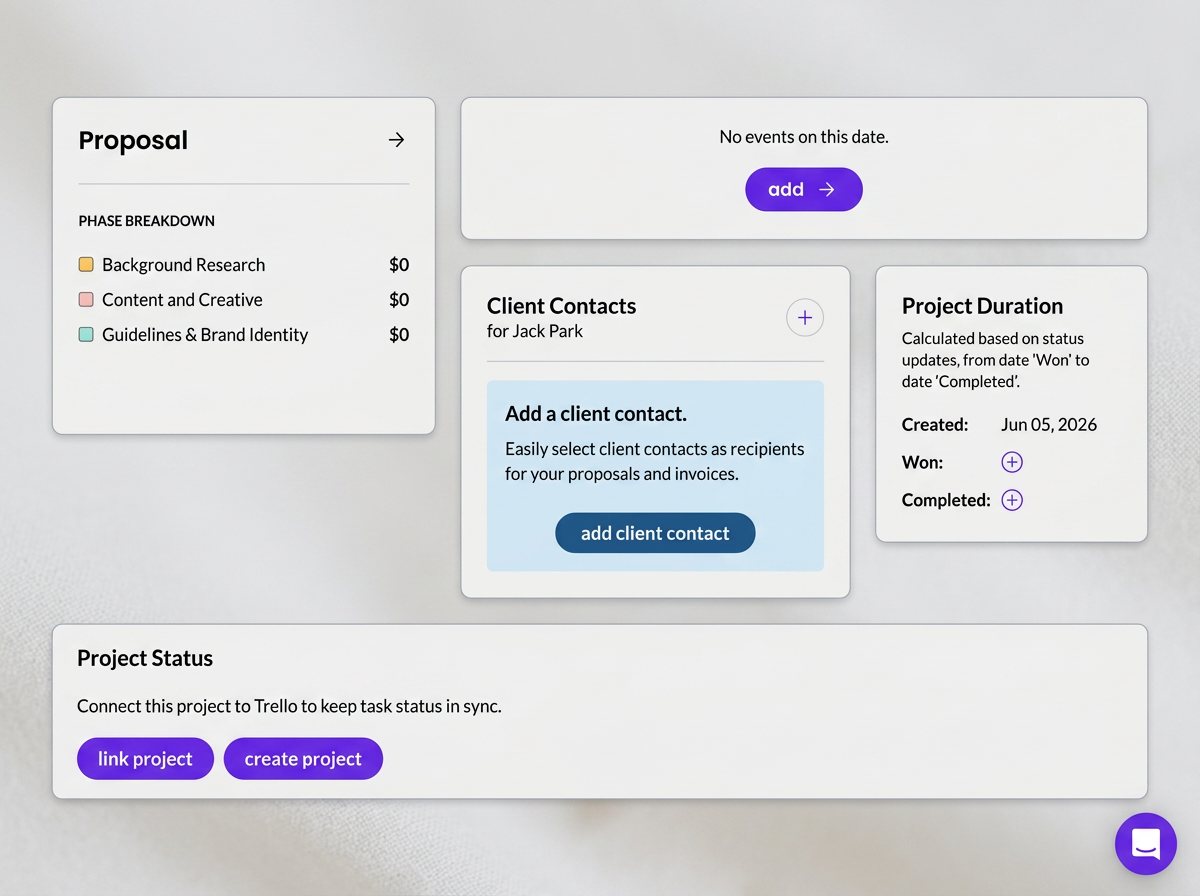
The full project view before I'd connected anything. Scroll to the bottom and you'll find Project Status: link an existing board, or create a new one.
I chose to create a new board for this project rather than fold it into an existing one, mostly because I wanted a clean, dedicated space I could shape around exactly how I planned to work this engagement. The moment I did that, Wethos didn't just create an empty board and leave me to fill it in. It took the entire proposal, every deliverable I'd scoped and priced, and turned it directly into cards.
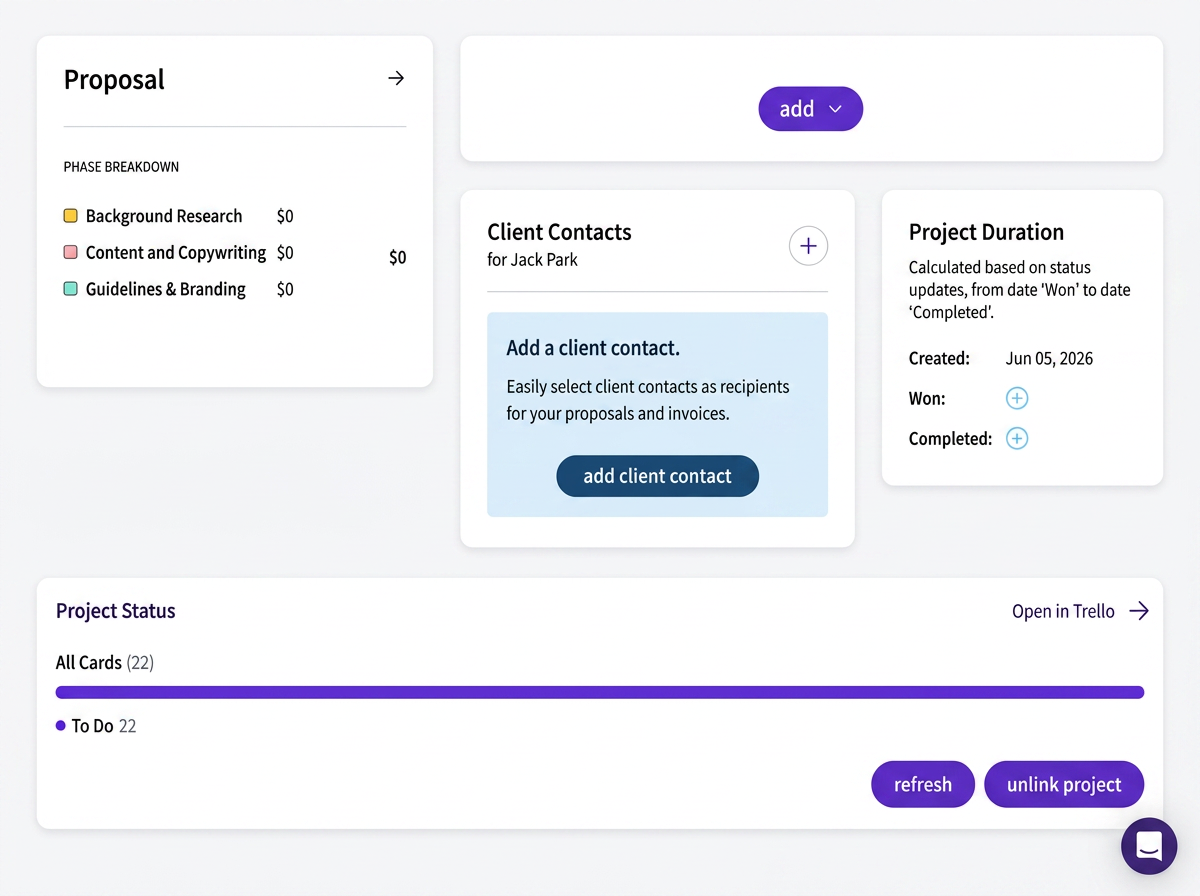
Once it's linked, Project Status shows the sync is live, twenty-two cards from my proposal, sitting in To Do.
Twenty-two cards, and I hadn't typed a single one of them myself. Every line item from the signed proposal showed up on the board exactly as I'd scoped it.
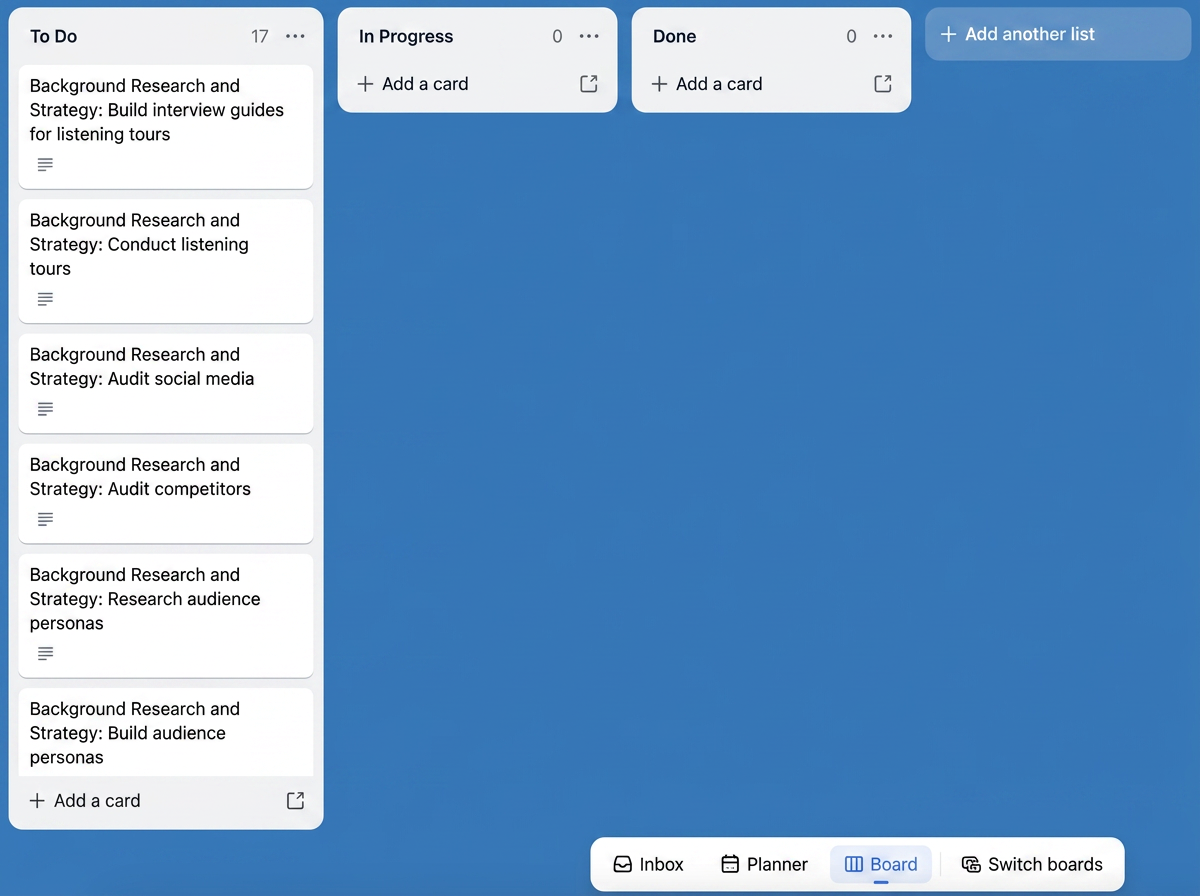
The board the moment it connects: every card drops straight into To Do, In Progress and Done both empty and waiting.
That's the default board Wethos hands you, three lists: To Do, In Progress, Done. It's a fine starting point, but it's not how I actually work, so the next thing I did was rebuild it.
Rebuilding the board around how I actually work with an AI Agent
The three default lists don't leave room for the part of this whole system I actually care about: where does the AI's work sit before I've looked at it, and where does it sit once I have? So I laid out my own lane structure instead, one that mirrors the exact flow I wanted a card to travel, and answers that question at a glance:
To Do, work that's scoped but not yet started.
In Progress/Working with Client, anything that needs the client's input before it can move.
Agent Working, the trigger lane. The moment a card lands here, that's my signal to the automation that it's time for the agent to pick it up.
My Review (Human Review), where the agent's finished output lands for me to actually check.
Client Review, once I've signed off, this is what the client actually sees.
Done/Content Posting/Calendar Completed, closed out.
Agent Working is the one worth slowing down on, because it's the lane doing the actual job of connecting AI to this whole system, and it's the piece that matters most if you're new to any of this. Think of it like a mailroom: nothing gets sent out until something is physically dropped into the right bin. The bin here is the Agent Working list, and dropping a card into it is the one action that tells an AI agent, this is ready, go do your part. Every lane before it is just organizing the work. From Agent Working onward is where AI actually starts saving you real time, because from that point, research that used to cost me an afternoon happens on its own, in the background, while I'm doing something else entirely, talking to a client, working on the part of the project that's actually mine to do. This is really the lane where you decide, task by task, what belongs to you and what belongs to the agent, and getting it right is what makes the rest of this whole setup worth building.
Here's what that looked like once it was actually built and running, my real board, mid-project:
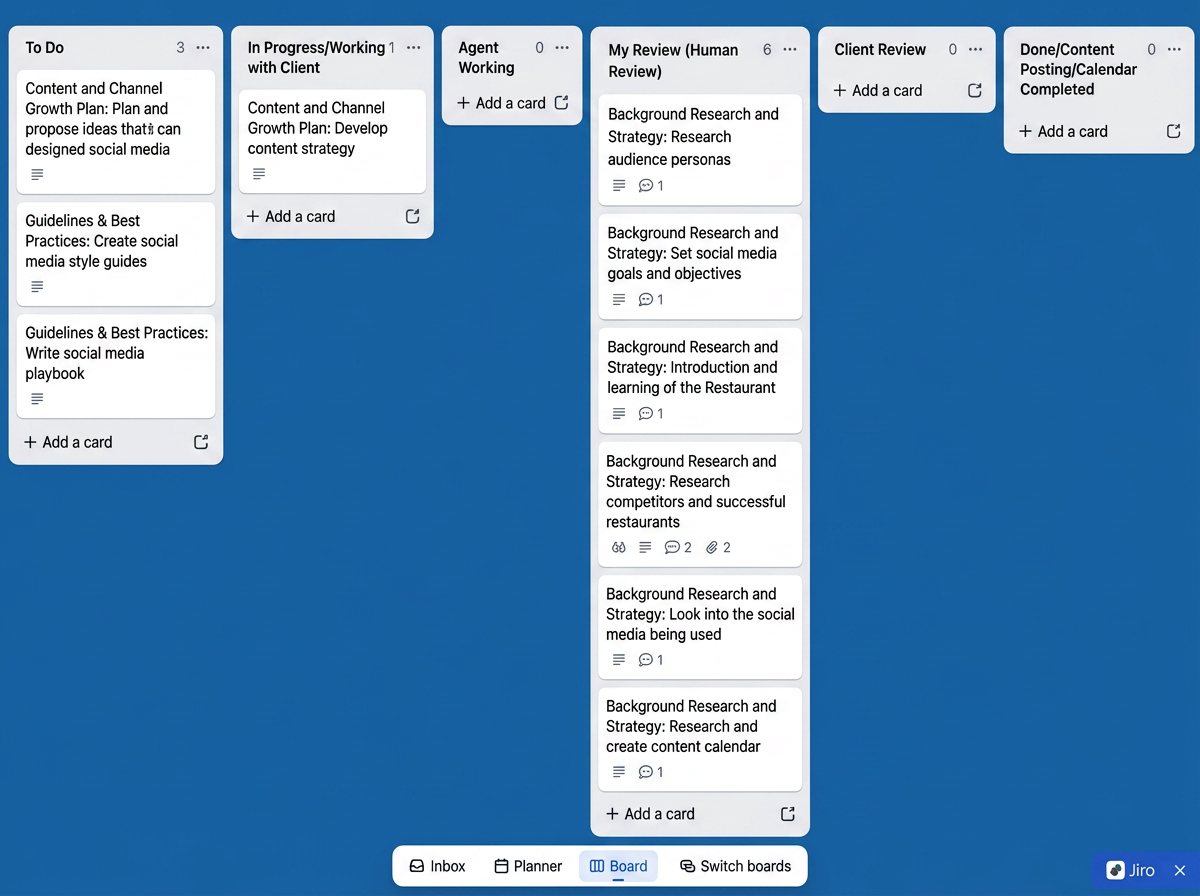
My actual board, rebuilt into six lanes. My Review (Human Review) already has six cards sitting in it, each with the agent's research attached as comments and files.
I'll walk through exactly how those six cards got there on their own in a minute, but first, here's how I built the automation underneath this board.
Setting up the automation rule
A renamed board is still just a board until something happens automatically when work moves through it, and this next part is really where AI stops being something you occasionally ask for help and starts being a system that works on its own. If you haven't built an automation before, don't worry, it's not code, it's closer to a simple rule: when this happens, do that. With the sections named, I needed the board to actually do something when a card moved into Agent Working, instead of that move just being a note to myself. Trello's automation lives right on the board, so I opened it up.
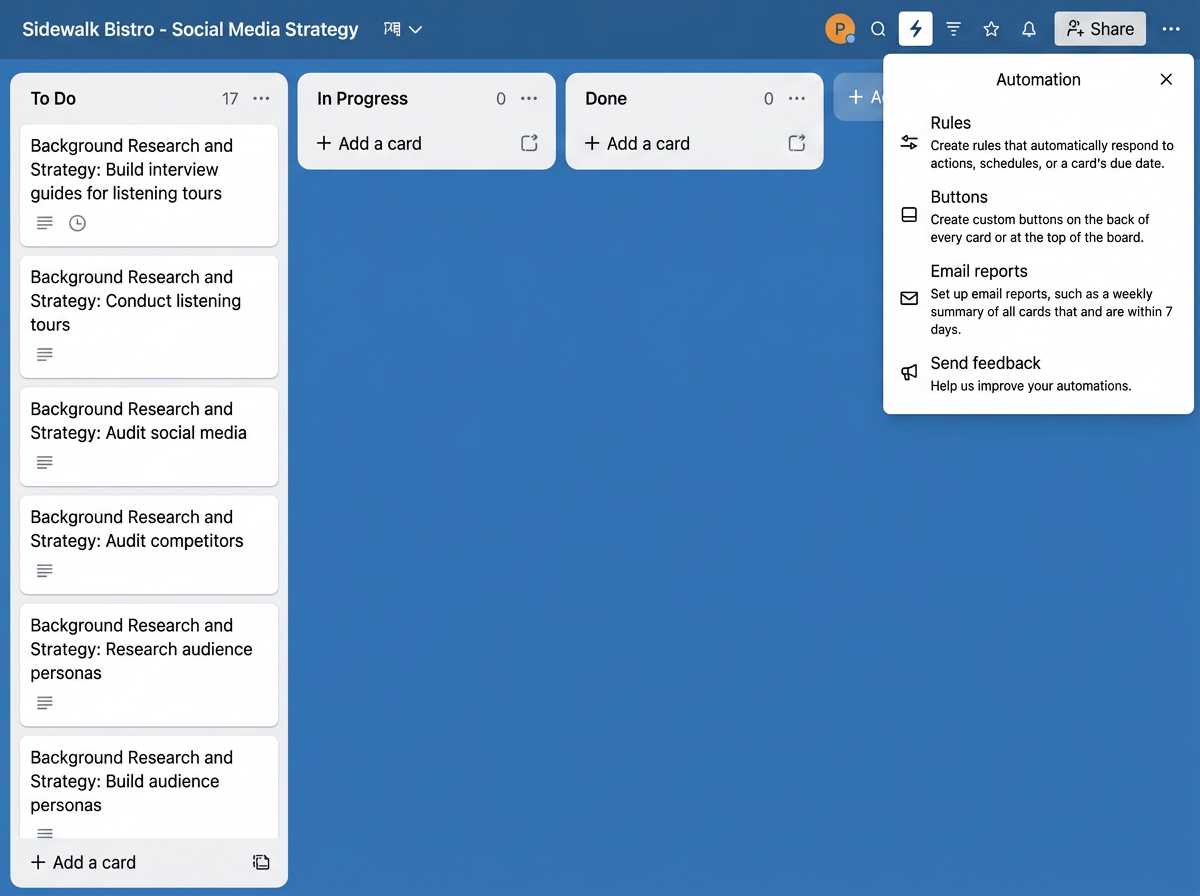
Trello's Automation panel, opened from the board itself. Rules is where the actual trigger-and-action logic lives.
From there I went into Rules and started a new one. I clicked Rules, then Create a Rule, and the first screen is entirely about picking the trigger, in my case, Card Move.
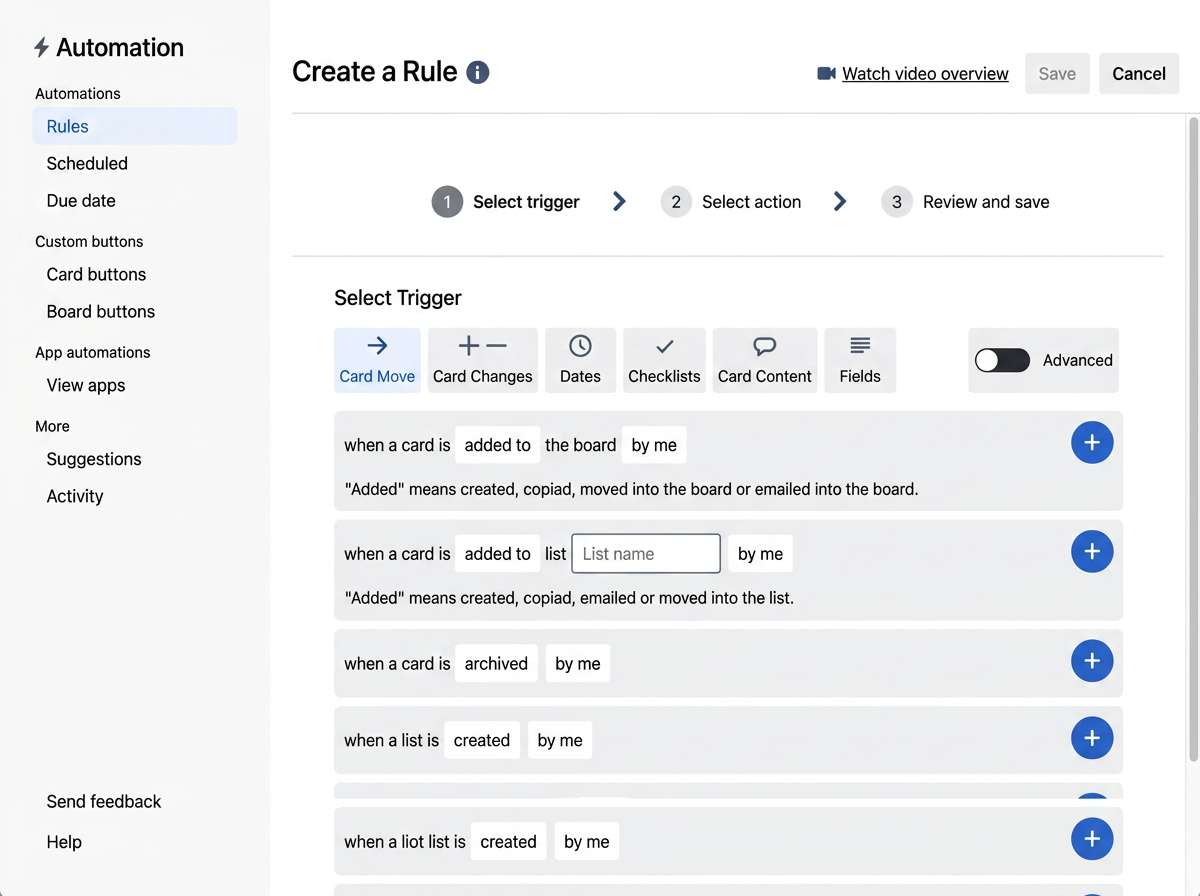
Building the rule: Select trigger, then Select action, then Review and save. I set mine to fire when a card is added to the Agent Working list.
I set the trigger to fire whenever a card is added to the Agent Working list I created inside of Trello. That's it, that's the entire signal the rest of the system runs on. Moving a card into that one list is no longer just me updating a status. It's the thing that actually kicks the work off.
Wiring the trigger to my own agent
The rule inside Trello only gets you halfway. It can post a comment, add a checklist, notify you, all inside Trello. To actually get an AI agent doing the work, I had to reach outside Trello.
Here's the loop I built, in order:
The trigger fires. My rule watches Agent Working. The moment a card lands there, Trello Butler (the automation engine behind Trello's rules) fires.
A webhook hands the card off. That trigger sends the card, and everything on it, out through a webhook, essentially a URL that says “this card just moved, here's its whole context.”
My agent picks it up. On the other end, I've got a Claude Routine set up to listen for exactly that. I built a specific agent for this: a set of custom Skill files I wrote myself, things like a competitor-research skill and an audience-personas skill, each one a plain instruction file telling the agent exactly how to do that particular job. When the webhook lands, the routine reads the card's context, the scope, the brief, whatever details came in from the original proposal, and runs the matching skill.
The agent writes its own work back. Once it's done, it doesn't email me the result or drop it somewhere I have to go dig it out. It writes straight back onto the card through Trello's REST API: posts the research as a comment, attaches the actual files, checks off what it finished, and moves the card into My Review (Human Review), on its own.
Getting that connection to actually work required an API key and token linking Trello and my agent together. I generated those once with the help of Claude, stored them somewhere safe, and every rule I've built since reuses the same pair.
Seeing it actually work
The payoff of all that wiring is genuinely satisfying to watch, or rather, to not watch. I move a card into Agent Working, go do something else entirely, and by the time I come back, the card has already moved itself.
Look at that Research competitors and successful restaurants card sitting in My Review. Two comments, two attachments, and I never touched it. That's the agent's competitor scan, done and waiting for me, exactly the kind of legwork I used to burn an afternoon on myself. Same for the audience personas card next to it, and the one on the restaurant's own background. Each one landed in that list on its own, with the actual research attached, ready for me to open and check. If your time is what you actually bill for, that's not a small thing, it's the difference between spending an afternoon on legwork or spending it on paying work.
Keeping the human gate
Here's the rule I never bend, no matter how well the automation is running: nothing moves from My Review into Client Review without me actually reading it first. The card landing in that list with research attached isn't the finish line, it's the point where the freelancer's job actually starts.
I check the competitor research against what I already know about the client. If something's off, I fix it right there before it goes anywhere near Client Review. The client never sees the difference between what the agent drafted and what I corrected, because by the time it reaches them, it's all been through me.
Why this is the piece that actually changed things for me
Before I set this up, AI was helping me one task at a time, and I was still the one carrying the work between tools. Now, a single card move on a board I built myself is enough to set an entire piece of research running, and it lands back in front of me, already done, without me having to go start it, check on it, or fetch the result. I'm still the one who decides what's good enough to send to a client. I just don't have to be the one manually kicking off every step to get there.
If you want to build something similar yourself, the shape of it is simple: get your proposal connected to a board, rename the lists around where AI's work needs a human check, wire one automation rule to one agent, and never let anything skip your own review before it reaches a client. That's really the whole method, and it's worth doing even if you start by automating just one small piece of your workflow.
Get started with Wethos, for free.